
In this article (6)
The cadastral nature (e.g. house, flat, land…) and the area are shown directly on the cadastral extract issued by FPS Finance, which you can request online via MyMinfin.
1. Go to the MyMinfin platform
Go to minfin.fgov.be and log in with your eID, itsme® or another secure means of identification.
2. Go to “Mon habitation et mes biens immobiliers”
- Click the “Mon habitation et mes biens immobiliers” (my home and my real estate) tab.
- Select “Demander un extrait cadastral” (request a cadastral extract).
3. Fill in the request
Fill in the form with your personal details, then click “SUIVANT” (next).
4. Choosing the product
- Documents for: “Urbanisme / environnement” (planning / environment)
- Product: “Liste partielle des biens sans mention du revenu cadastral” (partial list of properties without the cadastral income)
- Situation: “Situation la plus récente” (most recent situation)
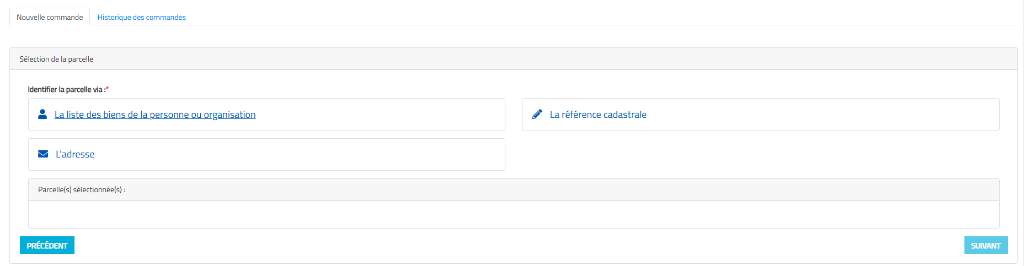
5. Identifying the plot
Click “La liste des biens de la personne ou organisation” (the list of the person’s or organisation’s properties).
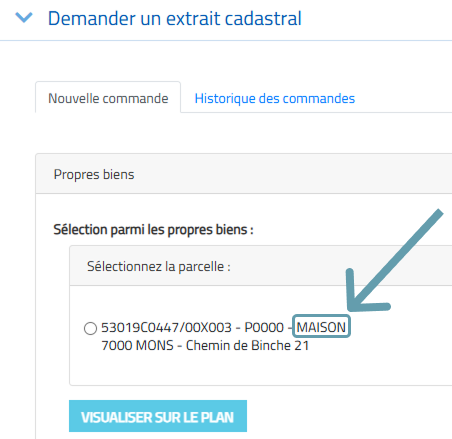
💡 Important: for your own properties, the cadastral nature is already visible free of charge in the list (e.g. MAISON, APPARTEMENT, GARAGE). For a client’s property, you need to order the extract.
6–8. Payment, receipt and reading the extract
Online, the extract is free for your own properties and costs €5 for a third party’s properties (€20 on paper). Most extracts are available within 48 hours in “Mes documents” (my documents) in MyMinfin.
👉 To convert the area into m²: How do I convert the cadastral area into m²?